
NEWS
Hardening the Perimeter: Why Hardware-Level Security is Your First Line of Defence
Explore how hardware-level security can help organisations strengthen their defences, reduce physical risks, and protect every layer of their infrastructure.
6
MIN READ
When enterprise IT leaders and Chief Information Security Officers (CISOs) review their organisation’s cyber security posture, software solutions inevitably dominate the conversation—and the budget. Next-generation firewalls, Endpoint Detection and Response (EDR) agents, Security
Information and Event Management (SIEM) platforms, and Multi-Factor Authentication (MFA) tools form the traditional backbone of corporate defence.
However, as cyber threat actors become increasingly sophisticated, software safeguards alone are no longer a guaranteed shield. Attackers have recognised that while operating system security controls are constantly monitored and patched, the foundation beneath them—the hardware, low-level firmware, and device supply chain—often sits in a blind spot.
If a device's hardware or firmware is compromised before or during deployment, every software-level security control running above it can be entirely rendered useless. For organisations managing remote workforces, field-based teams, or high-risk operational environments, securing physical endpoints at the silicon and chassis level is just as vital as pushing software updates.
Here is a deep dive into why hardware security must sit at the core of your enterprise infrastructure strategy, how low-level attack vectors operate, and what it takes to mitigate physical and supply chain risks effectively.
The Escalating Risk of Sub-OS and Firmware Attacks
Traditional Endpoint Detection and Response tools operate inside the operating system. They monitor running processes, track system memory, inspect network packets, and analyse file modifications. But what happens when an attack vector executes before the operating system even initiates its boot process?
This is the domain of sub-OS attacks. By targeting the system’s Basic Input/Output System (BIOS) or Unified Extensible Firmware Interface (UEFI), threat actors can establish persistent access that sits beneath the operating system’s visibility horizon.
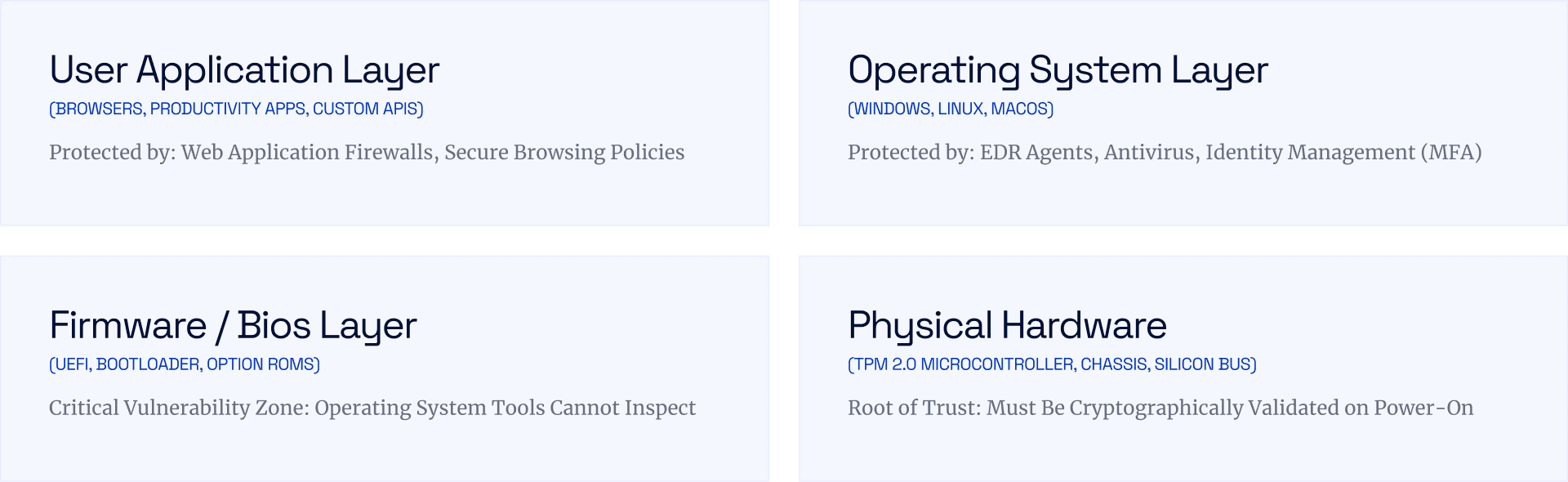
When malicious actors successfully inject rootkits or bootkits into a device's firmware, they gain a series of devastating operational capabilities:
Absolute Persistence: Because firmware resides on dedicated flash memory chips on the motherboard, the malicious code remains intact even if the primary operating system is completely wiped, the hard drive is replaced, or the system is re-imaged.
Invisible Privilege Escalation: Operating system security agents rely on the integrity of kernel calls. If the underlying firmware is compromised, it can manipulate kernel responses, effectively hiding processes and network connections from EDR scanners.
Key Extraction & Memory Bypassing: Malicious firmware can intercept cryptographic keys directly from system memory during power-on self-tests (POST) before drive encryption protocols like BitLocker fully engage.
According to enterprise security research, over 80% of organisations have experienced at least one firmware attack in recent years, yet firmware security updates remain among the least frequently applied patches in enterprise IT management.
Rugged Endpoints in Mission-Critical & Field Environments
While standard office laptops face significant risks, field operators, emergency services, engineering teams, and defence personnel operate under even more demanding threat models. Deploying standard commercial hardware into harsh operational environments introduces physical failure points that directly translate into cyber vulnerabilities.
When a standard laptop suffers physical damage—such as a cracked housing from a drop, ingress from extreme rain, or thermal throttling under direct sunlight—operational field staff are often forced into temporary workarounds. They may connect unauthorised personal devices to corporate networks, bypass strict VPN policies to send critical data, or leave storage media exposed. Physical frailty creates operational friction, and operational friction is the enemy of strict security compliance.
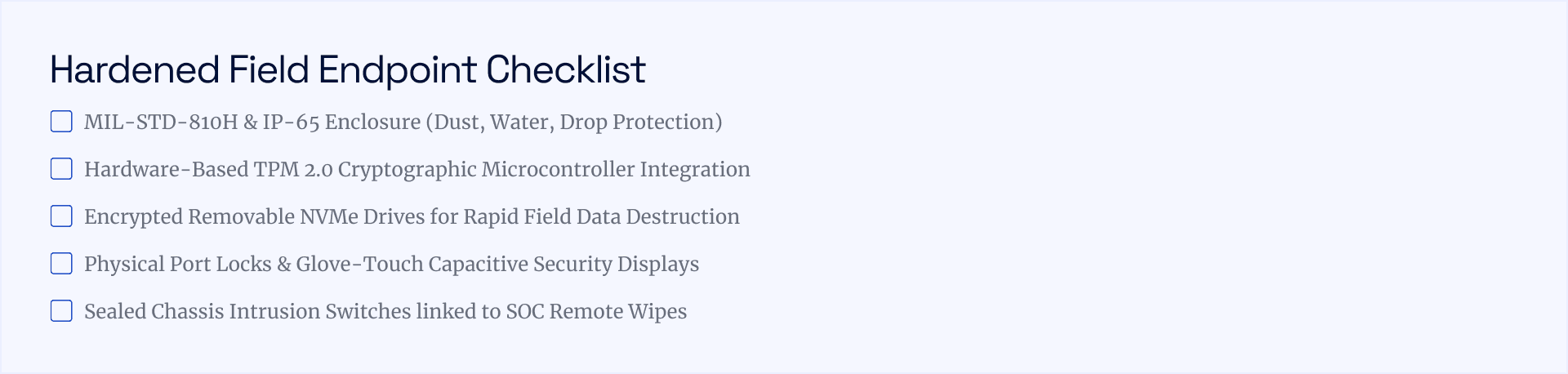
To maintain complete operational integrity in mission-critical conditions, Cyber Defence Service partners with leading hardware manufacturers to deliver specialised, fully hardened endpoints.
For field-bound operations, devices like the Dell Latitude 7030 Rugged Tablet and Dell Latitude 7220 Rugged Extreme Tablet bridge the gap between physical survivability and hardware-level cybersecurity:
Hardware-Verified Boot Sequence: Utilising an integrated Trusted Platform Module (TPM 2.0), these systems execute a cryptographic verification chain upon initial power-on. If any firmware byte has been modified without authorised signatures, the boot sequence halts immediately.
Environmental & Structural Resilience: With IP-65 ingress protection and testing against rigorous MIL-STD-810H military standards, internal components and NVMe storage drives remain physically isolated from environmental damage or mechanical shock.
Rapid Data Sanitisation & Field Security: Featuring encrypted, easily removable NVMe storage drives and physical port locks, operators can immediately extract or sanitise sensitive data if a device risks physical capture in high-threat locations.
Hot-Swappable Operational Continuity: Dual hot-swappable batteries ensure field operators never need to power down their secure sessions or rejoin wireless networks in unsecured public environments.
Deploying specialised, pre-secured hardware ensures that your remote team members maintain their defensive shield regardless of extreme environmental factors. You can evaluate our complete range of secure hardware solutions on our dedicated Products Page.
Enterprise Workstations: Securing Stationary Corporate Hubs
While field security addresses mobile and environmental hazards, stationary office environments present a completely different set of physical attack surfaces.
In a typical corporate office, desktop workstations are frequently left unattended outside of business hours. Unlocked USB ports, exposed Ethernet drops, accessible internal hard drives, and unsecured chassis enclosures create opportunities for physical intrusion, insider threats, or hardware key-logger installations.
Deploying streamlined, highly secure desktop architectures minimises physical attack surfaces without sacrificing performance. Systems like the Dell OptiPlex All-in-One integrate enterprise compute power with advanced physical and low-level protection:
Chassis Intrusion Detection: Integrated mechanical intrusion switches detect when the side panel or rear casing is opened. If tampered with, the system logs an immediate alert to your Security Operations Center (SOC) and can automatically revoke BitLocker encryption keys until IT resets the device.
Smart Cover Locks & Cable Enclosures: Physical port lockouts eliminate unauthorised physical access to USB ports, preventing malicious rubber ducky attacks, unauthorised data extraction, or Direct Memory Access (DMA) exploits via external buses.
Dell SafeBIOS Protection: Rather than relying solely on local BIOS chips, SafeBIOS utilises off-host cloud verification to check the firmware image against official, cryptographically signed hashes, preventing unauthorised firmware manipulation.
By standardising desktop infrastructure on secured all-in-one form factors, enterprise IT teams reduce visible cable clutter while drastically shrinking the physical surface area available to malicious actors.
Establishing a Complete Hardware Hardening Strategy
Achieving robust security requires aligning physical hardware procurement with your broader digital risk management framework.
To transition your organisation toward a hardware-hardened posture, consider implementing the following four-stage strategy:
1. Audit Your Existing Hardware Asset Inventory
Begin by categorising your current device fleet based on operational risk profile. Identify older laptops or desktops operating without dedicated TPM 2.0 microcontrollers, hardware root-of-trust capabilities, or active chassis intrusion controls. Pay special attention to endpoints used by executive teams, network administrators, and field personnel.
2. Standardise Secure Supply Chain Procurement
Hardware security begins long before a device arrives at your office. Ensure your equipment procurement partners provide secured supply chain tracking, factory-sealed tamper-evident packaging, and pre-configured BIOS security settings (such as disabling legacy boot modes, disabling unused physical ports, and enforcing strong BIOS passwords).
3. Implement Physical Device Controls
Enforce strict physical endpoint management policies:
Deploy physical port locks on exposed workstations in public-facing or hot-desking environments.
Require encrypted storage drives across all laptop and tablet deployments.
Mandate the use of privacy screens and physical webcam shutters for mobile workers.
4. Validate Defences Through Controlled Testing
Security policies are only as effective as their real-world implementation. Conduct periodic physical and offensive security audits to verify whether unauthorised personnel can gain access to exposed network ports, open workstation cases, or exploit unpatched firmware.
Understanding where your infrastructure is vulnerable before an attacker targets it is critical to maintaining a strong security posture.
Securing Every Layer of the Stack
As software-level security controls mature, cyber threat actors will continue shifting their focus downward into hardware, firmware, and physical access vectors.
By building your enterprise infrastructure on cryptographically verified, physical hardware platforms—whether deploying the Dell Latitude Rugged Tablet series for field operations or securing central offices with Dell OptiPlex All-in-One workstations—you establish a resilient foundation that protects your organisation from the silicon up.
Is your enterprise ready to audit its hardware security posture or upgrade its endpoint fleet with pre-secured hardware? Contact Us


